Ghostty tab titles for Claude Code: the 30-line zsh fix
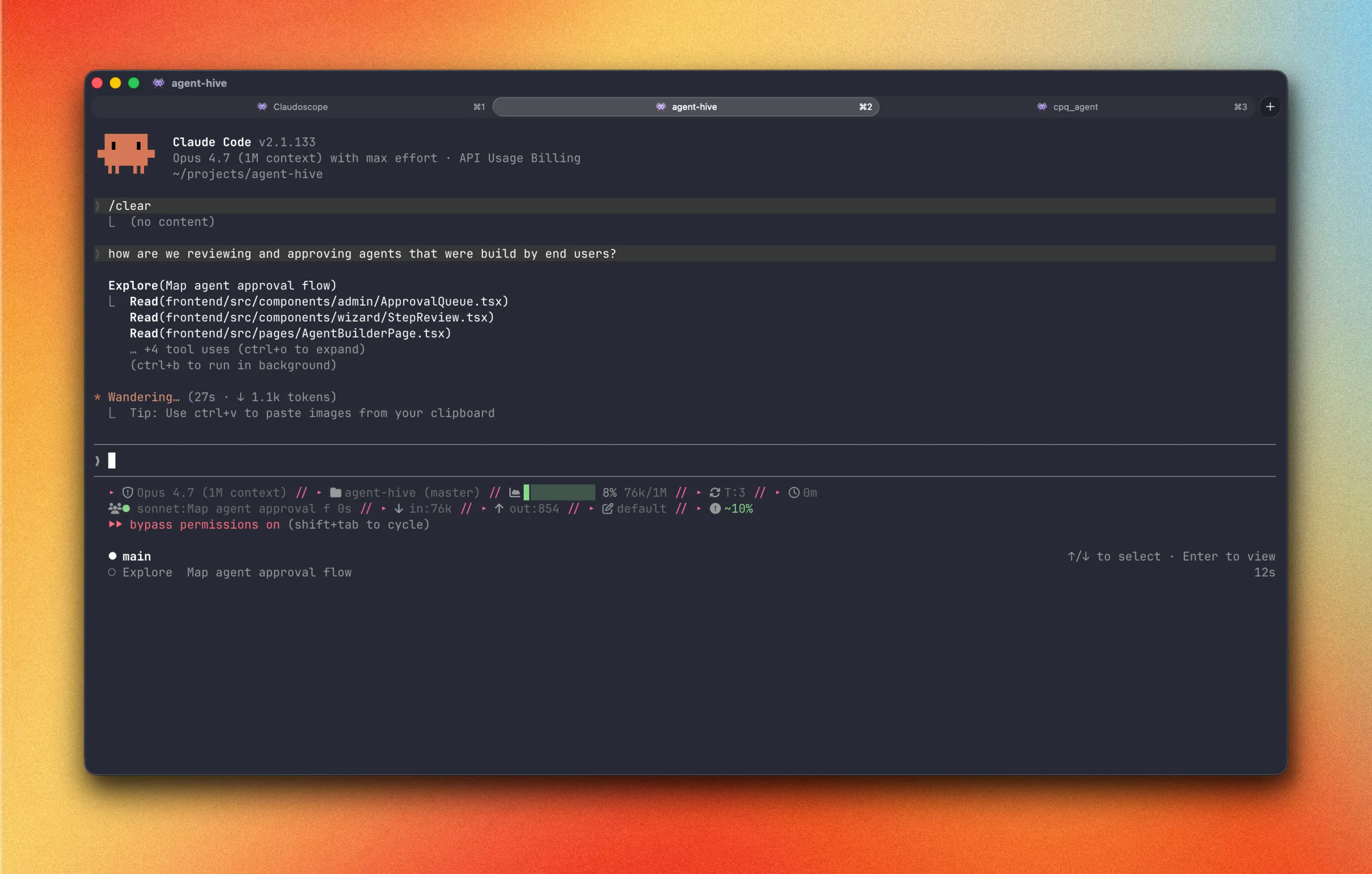
I had four Ghostty tabs open the other morning. Three projects, four tabs, each tab split into two or three panes. Every single tab in the tab bar said Claude Code. I cmd-tabbed three times trying to find the one running tests for claudoscope. By the time I scrolled the panes inside each tab to read a path or a prompt, I’d forgotten what I was looking for in the first place.
That’s a regression. Tab titles used to mean something. Then everyone started running an AI coding agent in every other pane, and the tab bar quietly turned into visual noise.
Here’s the Thing Two layers fight for the tab title every time you open a Ghostty tab. Ghostty’s shell integration sets it to the running process name (
zsh,claude,node), and Claude Code emits its own OSC 2 escape sequence to overwrite the title withClaude Code. Turn both off, then drive the title from a 30-line zsh hook that shows the git repo name by default and adds a 👾 marker the moment you launchclaude. Repo name when idle, agent when working, no manual reset.
Why every tab says ‘Claude Code’
Two layers of misbehavior, both on by default.
Layer 1 is Ghostty. Its shell integration sets the title to whatever process is currently in the foreground. At a prompt, the tab says zsh. Run claude, the tab says claude. Run node, it says node. Fine for a single pane. With four panes per tab, every tab settles on whatever its focused pane is running, which is almost never what you’re looking for.
Layer 2 is Claude Code. The agent emits its own OSC 2 escape sequence on startup and during the session, overwriting the title with the literal string Claude Code. Even if you’d disabled Ghostty’s integration, Claude would still clobber whatever title you had. Several open Claude Code GitHub issues asked for a way to turn this off, and an env var eventually shipped to do it. It just isn’t advertised anywhere prominent.
Stack the two and you get what’s in your tab bar right now. Ghostty steps on your title, then Claude steps on Ghostty’s. By the time anything reaches the tab bar, all signal is gone.
| Layer | Sets title to | Wins when |
|---|---|---|
| Ghostty shell integration | Foreground process (zsh, claude, node) | Always, unless disabled |
| Claude Code OSC 2 emitter | Claude Code | While claude is running |
| Your zsh hooks | Whatever you want | When the other two are off |
What I wanted
Five things, written as a checklist so I’d know when I was done:
- Tab shows the git repo name by default. If I’m not in a repo, the directory basename.
- Tab updates when I
cdinto a different repo. No manual command. - When I launch
claudein a pane, the tab gets a visible marker so I can see at a glance which panes have a session running. - When
claudeexits, the tab reverts to the repo name automatically. - Works for my
claudedalias too, the one that adds--dangerously-skip-permissionsbecause I trust myself in a worktree (don’t @ me).
The fix, in three parts
Part 1: Tell Ghostty to back off
~/.config/ghostty/config:
shell-integration-features = no-titleOne macOS gotcha worth flagging. Ghostty might have generated a config at ~/Library/Application Support/com.mitchellh.ghostty/config instead of the XDG path. The XDG path wins if both exist, but cmd+, in the GUI opens whichever Ghostty thinks is canonical. Easiest fix: keep the file in ~/.config/ghostty/config so it lives in your dotfiles repo, and symlink the Application Support path to it.
Part 2: Tell Claude Code to back off
~/.claude/settings.json:
{
  "env": {
    "CLAUDE_CODE_DISABLE_TERMINAL_TITLE": "1"
  }
}
That env var stops Claude from emitting OSC 2 sequences for the rest of the session. It shipped in response to one of those open issues. Nothing in Claude’s startup banner mentions it exists, which is most of why nobody uses it.
Part 3: Drive the title from zsh
~/.zshrc:
# --- Ghostty tab title ---
autoload -U add-zsh-hook

function _ghostty_context() {
  local ctx
  ctx=$(git rev-parse --show-toplevel 2>/dev/null) && echo "${ctx:t}" || echo "${PWD:t}"
}

function _ghostty_set_title() {
  printf '\033]2;%s\007' "$(_ghostty_context)"
}

function _ghostty_set_title_for_cmd() {
  local cmd="$1"
  local ctx="$(_ghostty_context)"
  case "$cmd" in
    claude|claude\ *|clauded|clauded\ *)
      printf '\033]2;👾 %s\007' "$ctx"
      ;;
  esac
}

add-zsh-hook chpwd   _ghostty_set_title
add-zsh-hook precmd  _ghostty_set_title
add-zsh-hook preexec _ghostty_set_title_for_cmd
# --- end ---
_ghostty_context returns the git repo name if you’re in one, falling back to the directory basename. _ghostty_set_title emits an OSC 2 escape with that name. _ghostty_set_title_for_cmd checks the command line you just hit enter on, and if it matches a claude invocation, prefixes the repo name with a 👾. Three hooks, one per zsh lifecycle event.
How it works
The hooks each fire at a different moment in zsh’s prompt loop.
| Hook | Fires when | What this gives you |
|---|---|---|
chpwd | Every directory change | Tab updates the moment you cd into a different repo, no command needed |
precmd | Before every prompt redraw | Safety net: when claude exits and a new prompt is about to draw, the title resets to the repo name |
preexec | After enter, before the command runs | Intercepts the moment you launch claude and writes the marker title before zsh hands off to the child process |
The reason it feels automatic is that the hooks line up with the three things you actually do. cd into a repo and chpwd paints the repo name. Launch claude and preexec swaps in 👾 reponame. When the session ends, precmd runs before the next prompt draws and the repo name comes back. You never type anything to manage any of it.
One thing worth knowing: zsh’s preexec sees the command line after alias expansion. If clauded is a plain alias for claude --dangerously-skip-permissions, the existing claude * pattern in the case statement already catches it. If you’ve defined clauded as a function or a script, alias expansion doesn’t apply and you need the explicit clauded* pattern, which is why I included both. type clauded tells you which case you’re in.
Edge cases
A few honest limitations.
Surfaces, not tabs. Ghostty’s OSC 2 sets the surface (split) title, and the tab label follows whichever split has focus. So if a tab has three splits and only one is running claude, the 👾 only shows when that split is focused. Worth flagging because no zsh hook can fix it. Ghostty discussion #7581 tracks the request for persistent tab-level titles.
Other AI tools. The case statement is one line away from covering everything else:
case "$cmd" in
  claude|claude\ *|clauded|clauded\ *) printf '\033]2;👾 %s\007' "$ctx" ;;
  gemini|gemini\ *)                    printf '\033]2;✨ %s\007' "$ctx" ;;
  cursor-agent|cursor-agent\ *)        printf '\033]2;🖱️ %s\007' "$ctx" ;;
esac
Suspend and resume. Ctrl-Z triggers precmd, so the title goes back to the repo name even though the agent is still alive in the background. fg doesn’t match the claude pattern, so the title stays as the repo name through the resumed session. Acceptable to me, but worth knowing.
What I’d build next
Two things that would make this better, both blocked on Ghostty.
The first is tab color via OSC sequences. iTerm2 has supported OSC 6 ; 1 ; bg ; ... for years. Ghostty doesn’t yet (open issue #12235). The day it lands, the same case statement could drive tab color too: red for claude --dangerously-skip-permissions, blue for read-only mode. That’s a useful safety signal you can read at a glance, faster than reading text.
The second is the persistent tab-level title mentioned above. With that, a tab could stand for a project even when its splits are running mixed-purpose commands. Right now you can pick “repo name” or “agent marker,” but only one at a time per surface. That’s the limitation a lot of multi-pane workflows are bumping into.
Closing
Three configs. About 30 lines of zsh. Maybe 20 minutes to write. The friction it removes shows up dozens of times a day, and it’s the kind of saved-time you don’t notice until you sit down at a machine that doesn’t have it. Broken signals in a tool you stare at for eight hours a day add up. They just don’t show up on any dashboard.
If you’ve got a different cut of this (better hook patterns, support for more AI agents, tab color tricks), I’d take a look. The snippet’s in a gist if you want to copy it without retyping.
If you’re interested in the broader Claude Code surface area I keep finding things in, the hooks post is the obvious next read. The visibility problem with Claude Code sessions is what got me building Claudoscope in the first place. Broken tab titles are a tiny version of the same theme.